Pocket electronics lab with 157 calculators and datasheet lookup
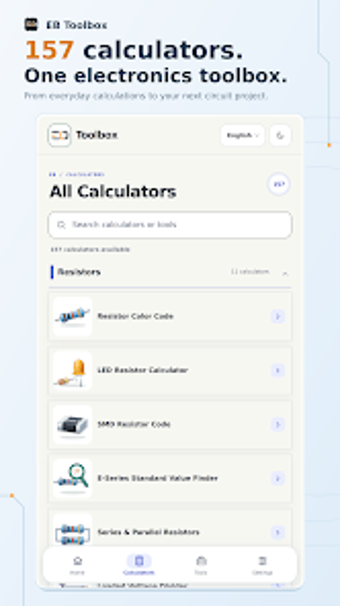
Provides 157 specialized calculators and a datasheet finder for on-the-spot circuit work, from Ohm’s Law to filter design. Elwar Braja, an electronics engineer and content creator, bundles resistor decoders, SMD marking tools, and power calculators into a single Android utility. Visual illustrations and dedicated inputs show circuit connections and numeric outputs. The app fits students, technicians, and makers who need a portable set of calculation and component-reference tools during design and troubleshooting.
What the app does for circuit calculation
The app groups 157 calculators that cover basic and advanced circuit math, so the user can compute Ohm’s Law values, RC time constants, LC resonance, and RLC impedance without switching tools. It also includes power management utilities such as battery life and regulator power dissipation calculators, which let a technician verify supply choices while sizing components for a build or repair.
How the app supports component identification and selection
The toolbox provides resistor and component code decoders for 3- to 6-band color codes and SMD markings, plus an integrated component datasheet finder. These functions let a hobbyist or student decode a part in the workshop and pull manufacturer specifications on the device, reducing the need to search separate reference sites when confirming part ratings or pinouts.
How it fits professional and educational workflows
The app’s visual-first approach presents illustrations alongside inputs, which helps translate numerical results into wiring and layout decisions for lab work or classroom exercises. For tasks like transistor biasing, op-amp calculations, and 555 timer timing, the presence of dedicated calculators means a user keeps calculation context and example diagrams in the same screen, supporting faster iteration during prototyping sessions.
Limitations around platform and collaboration
The app is available on Android and is optimized for phones and tablets, making it useful at the bench or in the field; however, the package is presented as a single-device utility without mention of file export or cloud sync, so collaborative editing or sharing of calculation sheets across a team is not outlined among the provided features.
Who should install EB Toolbox and when to look elsewhere
EB Toolbox: Electronics Tools suits students, DIY makers, and technicians who need immediate, illustrated calculators and a quick component lookup on Android. It supports detailed circuit and power calculations, but teams that require shared calculation files or cloud-based collaboration may need a different workflow. For solo bench work and rapid part identification, the app performs the practical calculation and reference tasks expected in electronics work.